AI Colorizer for Line Art
Start with a library page, one of your creations or line art you can use. Choose a color treatment; the original outlines are kept over the color result.
Preview of the colored output
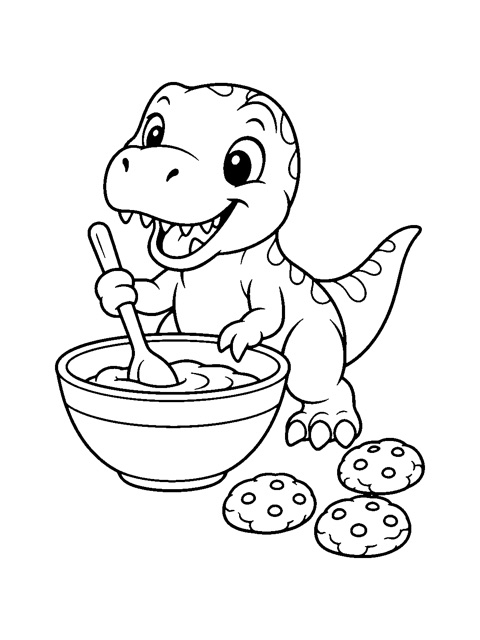
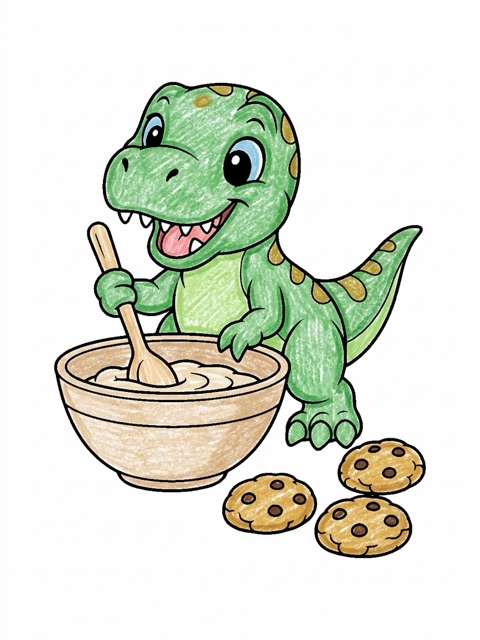
Each sample uses a released library drawing. Switch the color style to see how the same outlines look with another treatment.
- 1A dark outline against a white background gives the colorizer a clear boundary to follow.
- 2Try either a library sheet or a line drawing you created; both can be opened in the colorizer.
- 3For a scan or camera photo, flatten the paper and use even light so the lines remain crisp.
- 4The tool colors line art while preserving the source image’s colored pixels and original outlines.
How it works
Choose line art and preview a color treatment
- 1
Start with a drawing you may use
Choose a released library drawing, one of your creations, or upload line art you own or have permission to use.
- 2
Choose the finish and review its cost
Select Crayon, Marker, Watercolor, Pastel, Storybook or Realistic. The two-credit amount is shown before you begin.
- 3
Compare the color with your outlines
Review the result beside your original. Save the private PNG, or use Touch up colors to correct an unexpected fill.
Styles
Pick a finish for the same line drawing
- Crayon
- A grainy wax finish gives the fill a hand-colored feel.
- Marker
- Use strong marker-like tones with broad, even coverage.
- Watercolor
- Watercolor-style layers blend softly at their edges.
- Pastel
- A pale palette keeps the finished page gentle.
- Storybook
- Storybook hues add a warm, cozy mood.
- Realistic
- Natural shades with subtle pencil-like shadows.
Use the color preview to test a palette before coloring by hand, show a child how a page might look finished, or save a bright reference for a card or screen. Simple closed contours tend to produce more even fills; busy sketches may contain a few unexpected color areas.
Privacy
Your source and colored result stay private
The source drawing and its colored PNG are saved in private account storage and are not added to the public library. Upload only line art you own or have permission to use, and keep it family-friendly. Review the Acceptable Use Policy and Privacy Policy. Need a source page? Choose from the public library, create one with the text generator, or use the photo-to-line-art tool.
FAQ
Inputs, results and credits
How many credits are used for coloring?
Each successful coloring uses two credits. They are reserved when you start and charged when the result is ready. A task that cannot color the image uses none.
What can I send to the colorizer?
Choose a released library drawing, your own creation, or line art you have permission to use. Uploads may be JPG, PNG or WebP, up to 10 MB and at least 256 pixels on the shorter side.
Does the coloring replace my line art?
The delivered PNG places your original line art over the AI coloring, so the source outlines remain visible. If the model shifts a shape, we run one more coloring at no extra charge and deliver the better of the two results. For a local fill that still looks wrong, use Touch up colors: the bucket fills an area and the brush separates regions without a border. If neither attempt produces a usable coloring, the task ends without a result and no credits are used.
How are existing colored parts handled?
Existing color pixels such as photos, logos, borders or hand-colored areas are preserved. The tool colors black-and-white line art; a mostly colored photograph should first go through the photo-to-line-art tool.
Which model provides the coloring?
Google’s Nano Banana 2 (Gemini 3.1 Flash Image) is used through APIMart. An automated content check also runs on the submitted image and result.
What file is saved?
The tool saves a private PNG in My Creations, alongside the AI coloring and any saved touch-up. A portrait result is about 900 × 1200 pixels; check the file before printing at a larger size.