How to Choose Coloring Book Markers for Your Paper
Choose coloring book markers by paper type, compare alcohol and water-based ink, and check tips, bleed-through and printed outlines.
- Markers
- Printing
Table of Contents
I’ve been getting a lot of questions lately about how to choose the right markers for coloring books, and I wanted to address those questions. But first, let me say that you should definitely start by choosing the right printable book.
But if you have already chosen your printable book, here are some things to consider when choosing your markers.
1. Single-sided vs. Double-sided Pages
If you’re coloring pages from a printable coloring book, then it’s important to know whether or not the pages are single-sided or double-sided. This is different than the “single-sided” vs. “double-sided” options on the print dialog box. Those options refer to whether or not you want the page printed on both sides (i.e., as a booklet). The difference between single-sided and double-sided pages in a coloring book is whether or not the back of the page has a design on it.
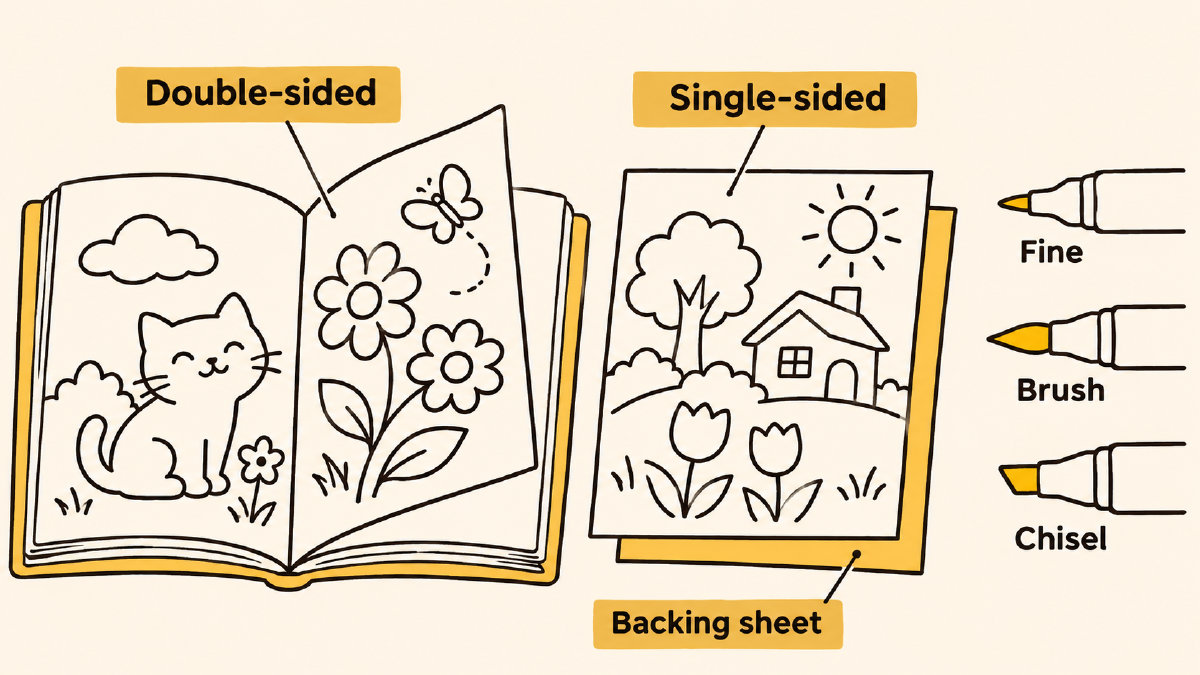
Before coloring, check whether your printed sheets have designs on both sides or whether the back side is blank. In any case, keep in mind that protecting the reverse side of a page does not protect the reverse side of the sheet. So if you color one side of a page, you may still run into issues with bleed-through onto the next sheet, or even onto the work surface beneath the paper. With alcohol markers, a backing sheet protects later pages, but bleed-through can still ruin the design on the back.
In general, alcohol-based markers produce smooth colors with excellent blending capabilities, so they’re great for fills and shading. Water-based markers don’t blend quite as easily, and can leave streaks in certain situations. Even if a listing says they’re non-bleeding, you’ll want to test a small area, since bleed-through varies with paper and marker brand. That said, alcohol-based markers are also more forgiving when it comes to layering. Repeated dry layering with water-based markers can damage basic printer paper or cheaper coloring-book paper. Water-based markers can be used with added water to get the watercolor-like blending effect, but that requires the paper to be able to handle the extra moisture.
2. Fill and Shading
The type of fill and shading you plan to do will affect your marker choice. Alcohol-based markers allow for smoother fills and easier blending and layering on suitable paper. Water-based markers can be tricky to use for repeated dry layering because of the paper demands. On basic printer paper and cheaper coloring-book paper, adding too many layers with water-based markers can actually damage the paper. Water-based markers can be used with added water to get the watercolor-like blending effect, but that requires the paper to be able to handle the extra moisture.
3. Dual-tip Descriptions
Dual-tip markers are often described as having combinations such as fine-and-chisel, fine-and-brush, etc. But these descriptions are usually misleading. For example, the fine-and-chisel combination is typically used for alcohol markers, while the fine-and-brush combination is used for water-based markers. It’s important to note that dual-tip markers are just two tips that can be used together. There isn’t a universally best tip for every design. Some people prefer a fine tip for outlining, and others prefer a brush tip for coloring.
4. Printable Paper Selection
When selecting printable paper, there are several factors to consider. First, you’ll want to determine the finish of the paper. Most printable paper is available in matte, gloss, or satin finishes. Matte paper is the most common type of printable paper, and is ideal for printing photos and other images. Gloss paper is ideal for printing photographs, and provides the highest quality prints. Satin paper is a good option if you want something between matte and gloss.
Next, you’ll want to decide what kind of medium you plan to use on your paper. If you plan to use inkjet printers, you’ll want to select paper that is designed for inkjet printers. If you plan to use laser printers, you’ll want to select paper that is designed for laser printers.
Finally, you’ll want to determine the weight of the paper. The heavier the paper, the less likely it is to bleed through. Paper weighing 90–100g/m2 is most commonly used in household and office printers. Heavier papers include 160g/m2 options and 200–300g/m2 stocks, so check what your printer can handle. The paper weight doesn’t necessarily affect the amount of bleed-through, but it does affect the overall quality of the print. Julia Henze’s comparison of 75g/m2 and 160g/m2 paper describes less bleed-through with the thicker paper, not a guarantee. The supplied guide also recommends different paper surfaces for alcohol markers and water-based techniques with added water.
5. Printed Outline Compatibility
Before coloring your design, you should always make sure that the printed outline will work with your markers. To do this, simply take a spare print of the design and test it with your markers. If the printed outline works well with your markers, then you’re all set! If it doesn’t, then try a different printing method, such as laser printing on compatible paper, and test again.
There are some things to consider before testing. First, for the documented preliminary Copic compatibility check, you’ll want to print a single letter at approximately 20pt on regular printer paper and test it with your markers. The letter’s size does not guarantee protection against bleed-through. The ink-test author also reported some bleeding with heavy colorless-blender use, despite otherwise successful results with their home inkjet printers.
Second, the type of printer you’re using will affect how well the printed outline works with your markers. Some printers are better at handling certain types of paper and ink than others. If you’re unsure, I recommend that you try a few different printers until you find one that works well with your paper and ink.
Third, the amount of time you spend working on the project will also affect how well the printed outline works with your markers. If you spend a lot of time working on the project, you might end up damaging the paper.
Fourth, the type of markers you’re using will also affect how well the printed outline works with your markers. Some markers are better suited for certain types of projects than others.
Finally, the type of paper you’re using will also affect how well the printed outline works with your markers. Some papers are better suited for certain types of projects than others.
So, in summary, when choosing your printable book, you should always start by selecting the right paper. You can inspect books in ColorPageGen’s printable book collection and choose an A4 or US Letter PDF. And if you’re unsure, I recommend that you try a few different printable books until you find one that works well with your paper and ink.
Sources
Make a coloring page
Turn an idea into a private drawing with printable A4 and US Letter PDFs.
Try the coloring page generator